Build for communityYou ship something people actually use. Not only a college assignment.Great way to build a portfolioA merged PR is better than "I know Git" on a resume. They can click it.Hiring happens on thisLots of hiring is on open source contribution basis. Mentors already saw your work.Networking, grants, funding, airdropsPeople in these orgs remember names. Opportunities come from that.Challenging and excitingBig codebases. Real reviews. You grow faster than tutorials.Boosts your knowledgeYou learn how production software is actually written.Web3 is inherently open sourceIf you want this industry, this is the default way of working.Open Source in Web3 / BlockchainProtocols, clients, tooling. Same GitHub habit as GSoC.
Also this
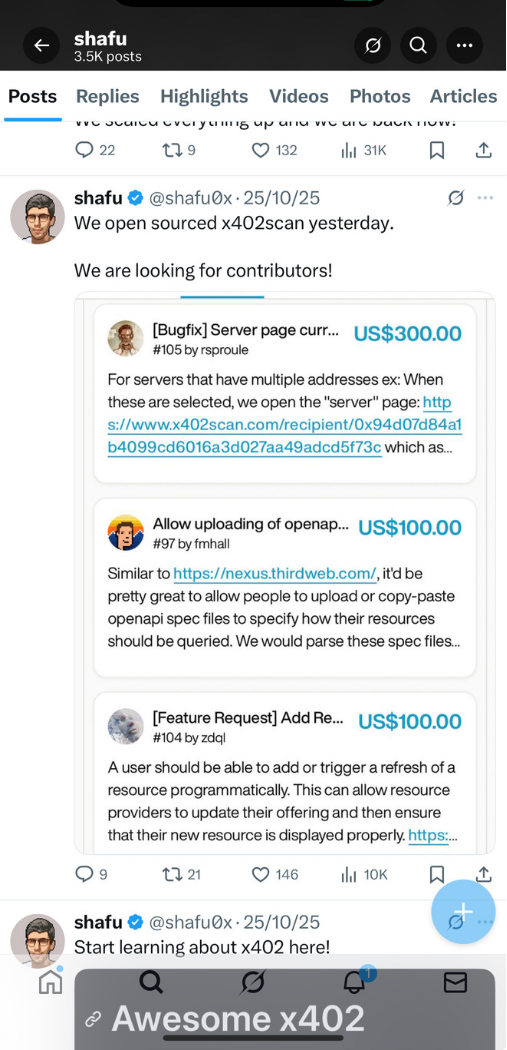
There is money in open source
Not only GSoC stipend. People put cash on GitHub issues. You fix it, you get paid.
$300. $100. $100.Small bugs and features. Real dollars sitting on the issue.Same GitHub workClone, branch, PR. That is how you collect this. No new magic.Happening right nowWeb3, x402, random repos. Open source is not only free labour.
GSoC
What exactly is GSoC
Google Summer of Code is a global, online program. New contributors work with an open source org on a 12+ week programming project, under mentors.
Look aroundOrg listOpen the GSoC org list. Pick 2-5 orgs you can actually run.ThenContributeIssues, small PRs. They should know your name before the form.MarchProposalWrite how you will build it. Clear timeline. Not a copied PDF.If selectedBonding3 weeks with the community. Then 8-22 weeks of coding.SummerShipMentor reviews you. Stipend comes if you pass evaluations.
Why bother
How GSoC helps you
InterviewsCredibilityShows you know something. Adds a star to your profile. You get a real project to discuss.ResumeSelectionYour resume gets a powerful point. Helps you get shortlisted.SkillLots of learningYou work on big codebases. You learn to be consistent. That stays with you.MoneyStipend toh hai hiGoogle pays you if you pass evals. Country-based. Not the only reason, but yes it is there.
Money
Stipend toh hai hi!!!!!
Google pays you for the summer.Only if you pass mentor evaluations. Don't come only for the money. Come to learn a big codebase. The stipend is the bonus.
Selection
Org selects students on the basis of
1
ProposalHow clearly you explain the project and the timeline.
2
Number of contributionsMerged PRs they have already reviewed.
3
Proof of conceptA small demo that you can actually build this.
4
Your experiencePast open source, projects, internships. Don't bluff.
5
Activeness in their communityChat, issues, comments. They pick people they already know.
Proposal
What is a good proposal
1
Explain how you will develop that projectClear manner. Not buzzwords. Actual steps.
2
Mention work experience and achievementsHackathons, internships, anything real.
3
Mention any past open source experienceEven small docs PRs count. Put links.
4
Give a clear and real timelineWeek by week. Something you can actually finish.
Best way?
Good proposal is not only English.
Any one of these can work. Best is contributions plus a small POC.
Option ALow contributions + good POCOption BHigh contributions + low POCOption CJust very high contributions
Don't bluff in the proposal. Don't just write anything. Mentors can tell in 2 minutes.
Projects
Types of projects
Most commonExisting project, new featuresYou extend something that already works. Improvements also count.HarderNew projectsYou start something fresh. Need a very clear POC.MiddleExisting project, new moduleSame repo, new piece. Nice if you already contributed there.
How to start
Don't apply to 20 orgs.
1
Have a good grasp of one tech / languageDon't try a new stack only for GSoC. You may fail, or not even apply.
2
Analyse all organisations and projectsRead the org list. See what you can actually run on your laptop.
3
Narrow down to max 3-5 organisationsAll orgs have different selection criteria. Depth beats spray.
4
Pick 1 or 2 projects and start contributingUnderstand the codebase. 7-8 focused days and it starts making sense.
5
Give ample time to the proposalLast night Google Doc will not work.
Community
How to reach out to organisations?
Don't send "Hi I want GSoC please select me." Talk on their channel, about a real issue.
Find their chat
Discord, Slack, Matrix, Gitter
→
Read first
CONTRIBUTING, idea list, old PRs
→
Ask one thing
A specific issue, not "how do I start"
→
Stay visible
Same org. Same name. Every week.
Tips
Some do's and don'ts
Do this
Focus 7-8 days on one codebase It feels hard at first. Then it clicks.
Analyse yourself, pick the right org That is the actual tip to success.
Be available in the coding period You can fail after selection if you disappear.
Just focus Competition is high. Don't be afraid. It is actually easy if you show up.
Don't do this
Don't bluff in the proposal Don't just write anything.
Don't try a new stack / language You may fail, or not even apply.
Don't watch 40 GSoC roadmap YouTube videos Go to the org. Open issues.
Don't think GSoC is everything Still try. You will learn big codebases either way.
Programs
Fellowships / open source programs
GSoC is not the only door. Same method for all of these: contribute first, then apply.
Google Summer of Code
Outreachy
Summer of Bitcoin
Eth Fellowship by Devfolio
Polygon, Celo, other protocol fellowships
Eth Protocol Fellowship (Ethereum Foundation)
MLH Fellowship
GitHub Externship
YC Academy Fellowship
Code4GovTech @ MeitY
GirlScript Summer of Code
Other protocol-level fellowships
For women
Scholarships and programs
Grace Hopper Celebration (GHC) / GHCI
Adobe India Women in Technology Scholarship
Nutanix WIT Scholarship
Women Techmakers Scholarship
Red Hat Women in Open Source Award
Linux Foundation Training (LiFT) Scholarship
Western Digital STEM Scholarship
Internshala Career Scholarship for Girls
Goldman Sachs Global Scholarship and Mentorship
Pragati Scholarship (AICTE)
L'Oreal India for Young Women in Science
Qualcomm WeTech / Palantir / SWE scholarships
Google Conference and Travel Scholarship
Venkat Panchapakesan Memorial Scholarship
IIT Bombay Research Internship Award
Diversify Tech Education Scholarships
For women
Top internship programs
Outreachy
SheIntuit by Intuit
GSoC Systers Community
GirlScript Summer of Code
Rails Girls Summer of Code
Hack@Home by Atlassian
She Codes by Indeed
DevelopHER by Twitter
Google STEP Intern
Microsoft Codess / Garage / New Technologies
Facebook University for Coders
American Express Makeathon
Amazon AmazeWow
CODHERS by Adobe
Duolingo Thrive Program
DE Shaw Fellowship / VISA Code UR Way / Wintathon
Break
Tea. Stretch. Questions.
After this we do Git, merge, rebase, force push, then how to find issues and raise a PR.
Git
Version control systems
Git lives on your laptop. It saves snapshots of your code. That is version control.
Your machine · Git
git commit save a snapshot
git checkout -b new branch, jump on it
git status see what changed
Works offline. No account needed.
push ↑⇄↓ pull
The website · hosting
GitHub, GitLab, Bitbucket
This is where people meet
Issues and pull requests live here
GSoC mentors watch this, not your laptop
Hubs
Central hubs for code
Same idea. Different websites. Most open source you will touch is on GitHub.
Most commonGitHubAlso usedGitLabAlso usedBitbucket
Git
Seven commands. That's enough to contribute.
zsh · project
# get a copy$ git clone git@github.com:you/app.git
$ git status
# new branch, and you are on it$ git checkout -b fix/typo-readme
$ git add README.md
$ git commit -m "fix: typo in install docs"# send it up$ git push -u origin fix/typo-readme
$ git pull
clone copy the repo onto your machine
status always look before you add
checkout -b create the branch and switch to it
add stage only the files you mean
commit one idea, one message
push send the branch to GitHub
pull take other people's work
Git · branch
git branch does not switch you.
One command only makes the name. You are still on main. The other makes the name and puts you on it.
Two steps
still on main after the first line
# 1. make the name. you are still on main$ git branch fix/typo-readme
# 2. now jump on it$ git switch fix/typo-readme
# same two steps, older command$ git branch fix/typo-readme
$ git checkout fix/typo-readme
git branch only creates. Then you switch. Easy to forget the second line and commit on main.
One step. Use this.
create + switch
$ git checkout -b fix/typo-readme
# same thing, newer spelling$ git switch -c fix/typo-readme
$ git status
On branch fix/typo-readme
checkout -b is branch + switch together. -b means create. switch -c is the same idea.
Remember this
Every contribution is these six steps.
Fork is your copy. Upstream is the real project. You push to your copy, then open a PR into theirs.
01ForkCopy on GitHub
02CloneDownload to laptop
03Branchgit checkout -b
04CommitWhat changed, and why
05Pushorigin/your-branch
06Pull requestAsk them to review
One issue → one branch → one PR. If it becomes big, split it.
Git · merge
Merge keeps both histories.
You were on a branch. Main also moved. Merge adds one extra commit that joins them.
Before
mainfeature
A
B
C
D
E
After git merge feature
mainfeature
A
B
C
M
D
E
A B C D E stay. M is the join.
main your branch merge commit
Git · merge
Sometimes Git does not even make a new commit.
If main did not move, Git just slides the pointer forward. That is fast-forward. If both sides moved, you get a merge commit.
Fast-forward
one line
A
Bold
C
Dnow
Main was behind. Pointer just moves. No M commit.
Merge commit
mainfeature
A
B
C
M
D
E
Both moved. Git makes M. The fork stays in history.
Git · rebase
Rebase puts your commits on top of latest main.
Git copies D and E, one by one, onto C. New hashes. D and E as you knew them are gone. History looks like one straight line.
Before
mainfeature
A
B
C
D
E
After git rebase main
mainold
A
B
C
D'
E'
D
E
Looks clean. But D' is not D. Hash changed.
Git · which one
Merge or rebase. Depends who else is on this branch.
Merge
mainfeature
A
B
C
M
D
E
Use on main, develop, any shared branch
Use when someone else already pulled your commits
The org merges your PR. You don't rewrite their history
Rebase
one line
A
B
C
D'
E'
Use on your own PR branch, sitting on your fork
Do it to sit on latest main before they review
Don't rebase commits other people already built on
Git · force
Force push overwrites GitHub.
You are telling the server: throw away what you have, take mine. Anyone who already pulled the old commits is now stuck.
GitHub before
origin
A
B
Ceveryone
Your teammate already pulled C.
After git push --force
origin
A
B
D
Cgone
Server has D. Your friend still has C. Their pull will fail.
Git · don't break the repo
Three rules. Write these down.
1
Never force push mainNot master. Not the org's default branch. Not someone else's branch. Ever.
2
Your PR branch only, and use leaseAfter a rebase on your own branch: git push --force-with-lease. It stops you if someone else pushed.
3
If you see those angle brackets, Git pausedBoth of you changed the same lines. Fix the file, git add, then continue.
conflict · same file
<<<<<<< HEAD
print("hello")
=======
print("hi")
>>>>>>> feature# delete the marks. keep the right code.$ git add app.py
$ git rebase --continue
Git · abort
Merge or rebase going bad? Abort.
Abort means: stop, undo this attempt, put me back. It only works while Git is still in the middle.
Abort a merge
you ran git merge
$ git merge feature
CONFLICT (content): app.py# too many fights. leave it.$ git merge --abort
# back to before the merge$ git status
Your branch looks like it did before you typed merge. The other branch is untouched.
Abort a rebase
you ran git rebase
$ git rebase main
CONFLICT (content): app.py# this is a mess. stop.$ git rebase --abort
# back to before the rebase$ git status
Same idea. Rebase never happened. Don't mix them. Merge abort for merge. Rebase abort for rebase.
Issues
How to search for issues and make a PR
good first issue
or help wanted · documentation
→
Read fully
comments, linked PRs, last activity
→
Still open?
skip if stale or already taken
→
Comment first
"I can take this" + how
→
Wait for yes
then branch. not before.
Platforms: GitHub issues, goodfirstissue.dev, org idea lists. Still read the thread.
Your PR
Ways to make your contribution safe
1
Use tested open source librariesFor common work. OpenZeppelin, npm libraries, etc. Don't reinvent crypto.
2
Write proper commit messages and PR titlesAlways put details about the feature and the code change.
3
Use testsFoundry, Hardhat, test suites. Battle test your code.
4
Linting and security pluginsClean code. Maintainers notice this immediately.
5
Scripts and tests for your featureIf they cannot run it, they will not merge it.
6
Keep learning new toolsThis field moves. That is normal.
Sharing
Sharing is important
LinkedInShare your work regularly. Merged PR, write a short post.Twitter / XShare content. A lot of opportunities show up here.Be activeSocial media is not extra. Orgs and recruiters look.SpeakShare your knowledge. Once you can raise a PR, you can explain it.
Target, then learn. Don't be afraid. Everything is possible. Without a project, your learning is nothing. https://mohitbhat.dev
 Mohit Bhat